iCloud Backup & Sync, rebuilt on CloudKit
Interested in a deeper look at the iCloud Drive to CloudKit transition?
Albums now live in CloudKit instead of iCloud Drive. Albums sync between your devices more reliably, and media streams in when you need it rather than downloading every file first. Your existing iCloud Drive albums move to the new storage in the background while you keep using the app. The upgrade is faster while the app is open, can use cellular data if you allow it, and you can leave it if something goes wrong.
Videos stream from iCloud. Long videos are stored in encrypted chunks, so you can start watching and skip around without downloading the whole file.
Offline-friendly. Cached media shows right away, even before the album finishes syncing. If iCloud can't be reached, you get a clear offline message and the copy already on your device.
Move albums in either direction between iCloud and This Device. Before a move you see its size, your free space and what will be removed. You get detailed status updates about the move, and a cancelled move rolls back cleanly.
Better syncing across multiple devices
Syncing of credentials and encryption keys is now much more reliable. Flipping the “iCloud Backup & Sync” toggle in Settings will store your passcode and encryption keys in iCloud Keychain, which will instantly be available across all your devices.
Your passcode and keys follow you. If you set up a new device while your passcode syncs in from another one, the lock screen waits and unlocks on its own once the passcode arrives.
Returning users get recognized. Reinstalling on an account that already has Encamera data no longer starts you over. You're offered three paths: restore with your key phrase, sync from another device, or start fresh.
Keys from iCloud Keychain are picked up automatically. If you have only one key, Encamera selects it without asking. If you have several, the key picker explains why.
Locked albums show up in your grid when their key is missing. You can enter the key right from the album tile to unlock them.
Redesigned look and onboarding
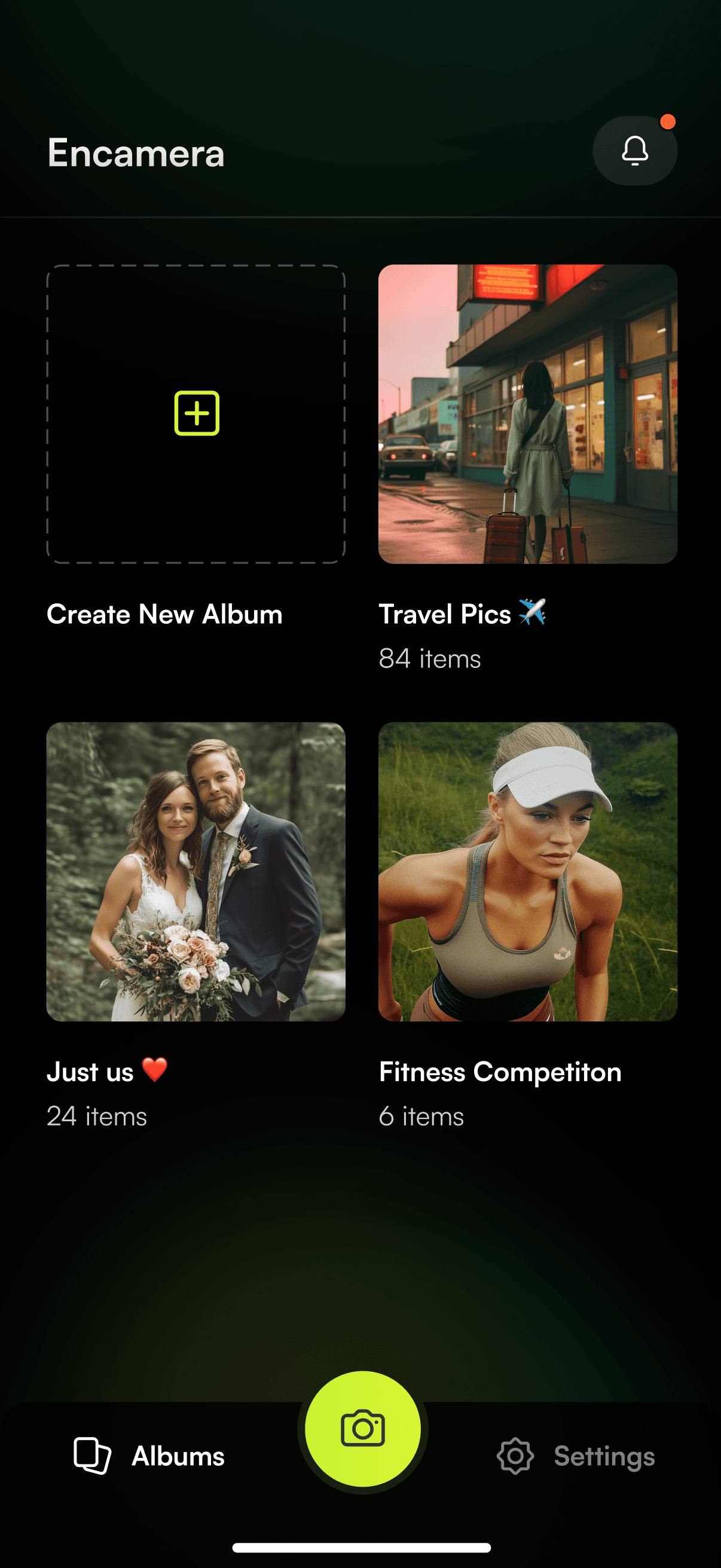
Redesigned album grid: album names sit over a frosted gradient, and a new + button in the top bar creates albums.
Liquid Glass tab bar on iOS 26, with the Camera tab kept separate on iOS 27.
Reorganized Settings with new icons, consistent page headers, and Notifications moved into Settings. The Settings dot now lights up only for notifications you haven't seen.
Links open in Safari View instead of an in-app web page that kept reloading.
Storage Insights
A new Storage Insights screen with separate This Device and iCloud tabs. Each tab breaks storage down into photos and videos, much like iOS Settings does.
Free Up Space clears cached copies and tells you exactly what it counted.
Low space warning before a Photos or Files import that won't fit.
Camera and media
Slow-motion videos import with their slow-motion effect and playback slowed.
Live Photos show the still portion right away and load the video in the background.
Microphone access is requested only when you need it, when you switch to video or turn on Live Photos.
Captures go to the hidden album you opened the camera from. A hidden album stays out of the camera when hidden albums are turned off there.
Captures are never dropped silently when no album is available.
AirPlay works for vault videos. Playback stops when the app locks or goes to the background.
Import progress updates within each file, and you can delete Photo Library originals after an import, even later on.
Privacy and security
No content flashes when you lock your phone. The app is covered immediately, and the lock screen runs in its own window so you come back to where you were.
The camera and hardware shutter stay off while the app is locked.
Stronger passcode lockout, plus recovery for accounts that use only Face ID or Touch ID. Copy now names your device's actual method (Face ID or Touch ID).
Password rules are checked during setup and in Settings.
Save your key phrase to your password manager with one tap. After a new album's first item, you get a prompt to save your recovery key, and a must-read reminder appears on your third album visit.
A safer reset wipes your keys across your account but keeps your encrypted media, so a key phrase can still recover it.
Other fixes
Fixed a launch crash when iCloud Drive is unavailable.
Fixed a crash when the app went to the background during a Face ID unlock.
Captures no longer retry forever when iCloud storage is full or an upload conflicts.
Covers and thumbnails stay correct across devices: missing thumbnails are repaired when opened, and deleted cover items fall back to the album's default cover.
Fixed jitter when swiping back from an album, and the lag when opening a new album.
Albums created before album-name encryption show up again.
Before you upgrade
Encamera 3.0 requires iOS 26 or later.